
Introduction
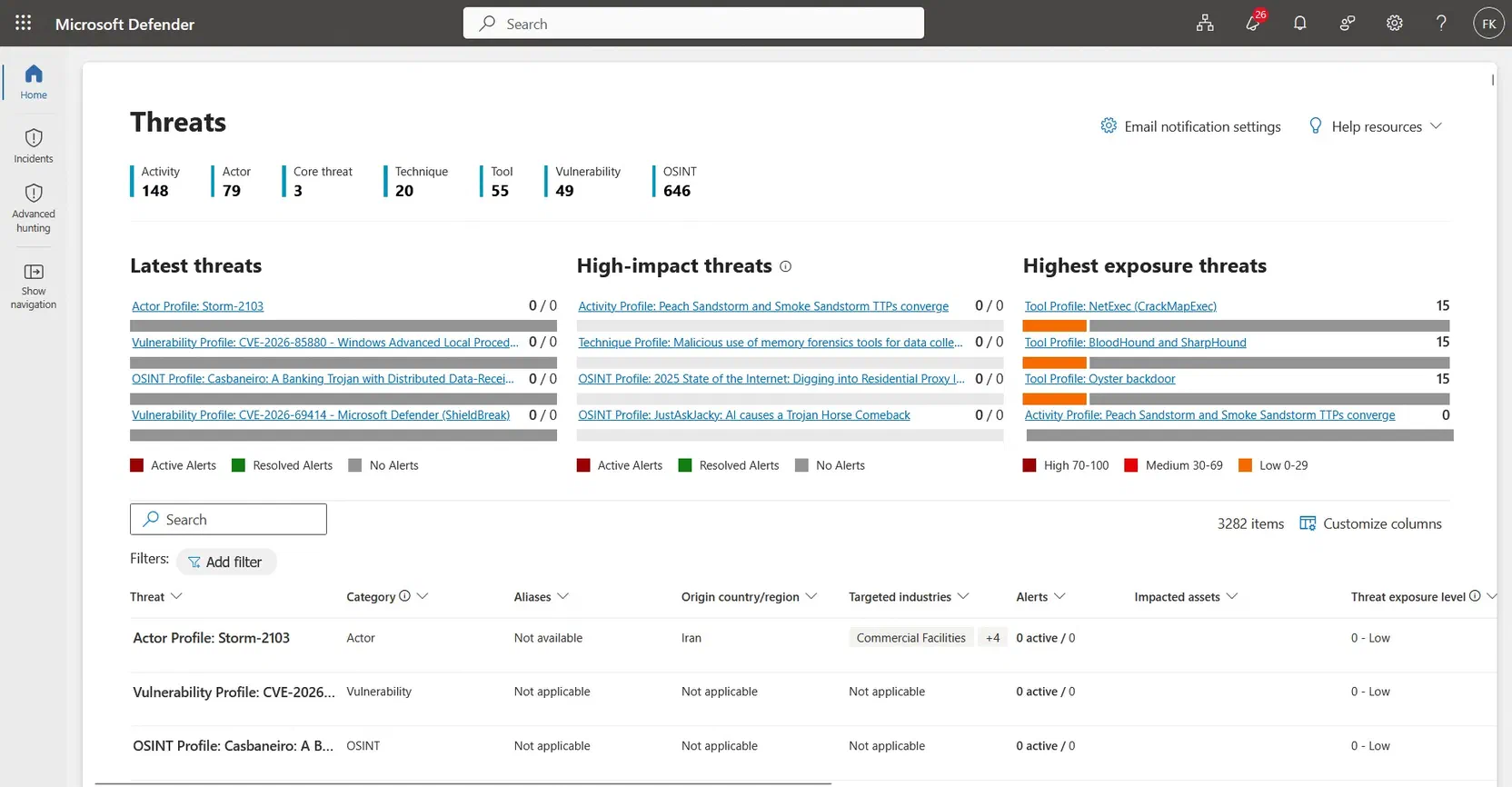
The final phase of the Microsoft Defender Threat Intelligence (MDTI) convergence went generally available in the Defender portal on 1 August 2026. The legacy standalone portal and the legacy Intel Explorer are retired, and Microsoft threat intelligence now lives in the Threat intelligence section of the Defender portal, in entity pages, in Threat analytics, and in Sentinel through a free connector.
I want to walk through what actually changed, how to enable the connector step by step, how to call the Graph API, and where I would still be careful before calling it done in a tenant. I checked every claim below against Microsoft’s current documentation, and where the documentation disagrees with itself I say so.
What actually changed
- The legacy experience is retired. Microsoft’s Learn documentation states that the legacy standalone Microsoft Threat Intelligence portal and the legacy Intel Explorer experience were retired on 1 August 2026. The Threat intelligence section of the Defender portal now has two primary pages: Overview and Intel explorer.
- The data is delivered through the free connector. Microsoft’s Message Center notice (MC1192257) says all MDTI data has been published via the free connector in Microsoft Sentinel, with new Threat Analytics APIs replacing retired MDTI APIs.
- The licensing is simpler. The same notice says that after 1 August 2026 MDTI capabilities require an active Defender or Sentinel license. Microsoft’s Learn pages add that publicly available Microsoft Threat Intelligence data, including entity enrichments, is available to Defender XDR customers at no additional cost.
One thing to do before anything else: if you built something on the old MDTI APIs, read the Message Center notice. It tells you to update your internal documentation for the new Threat Analytics APIs and connector availability, so check older integrations rather than assuming they carried over.
Intel explorer: searching and managing threat intelligence
Intel explorer is the search and investigation page in the Threat intelligence section (left bar). You search by keyword or value, pick a threat intelligence type, and narrow the results with filters. Per Microsoft’s documentation the types are campaigns, indicators, attack patterns, identities, threat actors, tools, vulnerabilities, and reports, and threat analytics reports are available directly from it.
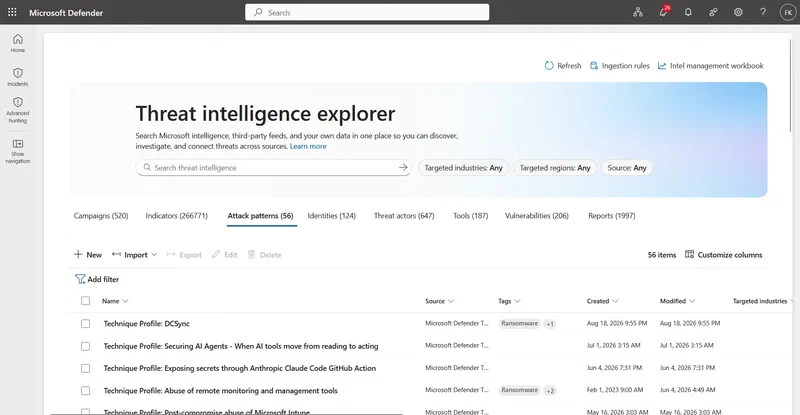
Beyond searching, the same page is where Sentinel threat intelligence is managed. Microsoft lists these capabilities for Intel explorer:
- Create STIX threat intelligence objects.
- Manage threat intelligence with ingestion rules.
- Manage relationships between objects, and add tags.
- Investigate indicators and related infrastructure (DNS, resolutions, WHOIS, subdomains, certificates, services, trackers, components, cookies).
- Query threat intelligence with advanced hunting.
- Export to TAXII 2.1 destinations.
For IP address and domain indicators you can also review GeoLocation and WhoIs enrichment. Microsoft marks that enrichment as preview.
To create or manage Sentinel threat intelligence here you need Microsoft Sentinel Contributor or higher. One practical warning from the documentation: do not paste suspicious indicators into a browser. Search them in Intel explorer instead, and remove the brackets from defanged values like contoso[.]com first.
Entity pages: reputation, infrastructure, and IoCs in context
Domain, IP address, URL, and file entity pages now carry a Threat Intelligence Insights tab. All Defender XDR customers can use it with publicly available Microsoft Threat Intelligence data at no extra cost.
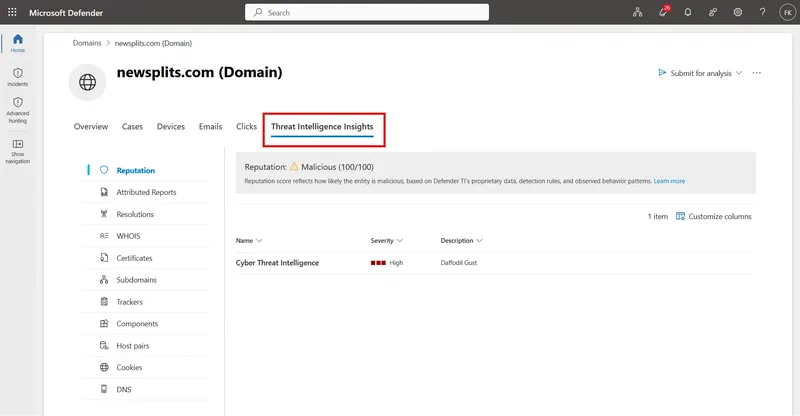
What you get depends on the entity type. IP addresses and domains get reputation, attributed threat reports, and infrastructure relationships (DNS records, WHOIS, host pairs, subdomains, TLS/SSL certificates, services, components, trackers, cookies). URLs and files get reputation, attributed threat reports, and sandbox analysis.
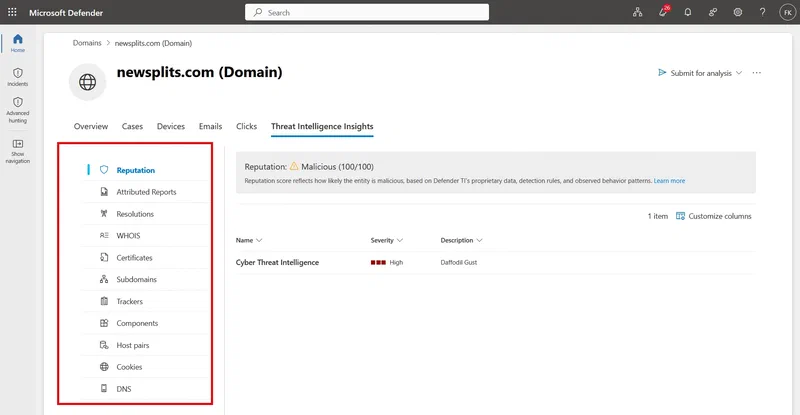
The reputation score is worth understanding rather than glancing at, since it is what you will triage against:

| Score | Category | What it means |
|---|---|---|
| 75–100 | Malicious | Confirmed associations to known malicious infrastructure on Microsoft’s blocklist, with matches to machine learning rules that detect suspicious activity |
| 50–74 | Suspicious | Likely associated with suspicious infrastructure, matching three or more machine learning rules |
| 25–49 | Neutral | Matches at least two machine learning rules |
| 0–24 | Unknown | One or zero rule matches |
Microsoft is explicit that the score should be read holistically. The combination of signals (top-level domain, hosting provider, name server, registrar, TLS certificate characteristics) predicts maliciousness, not any single rule.
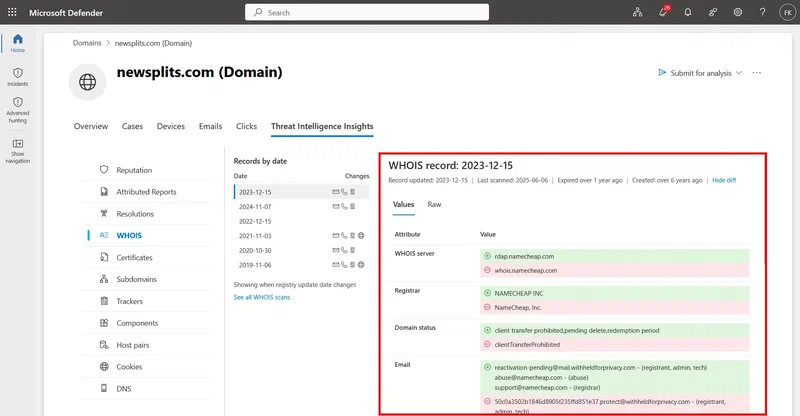
You reach the tab from an incident (select an entity in the evidence or alert details), from global search, from advanced hunting results, or by direct navigation. On the entity page it sits next to the Overview tab.
Threat analytics: reports and IoCs
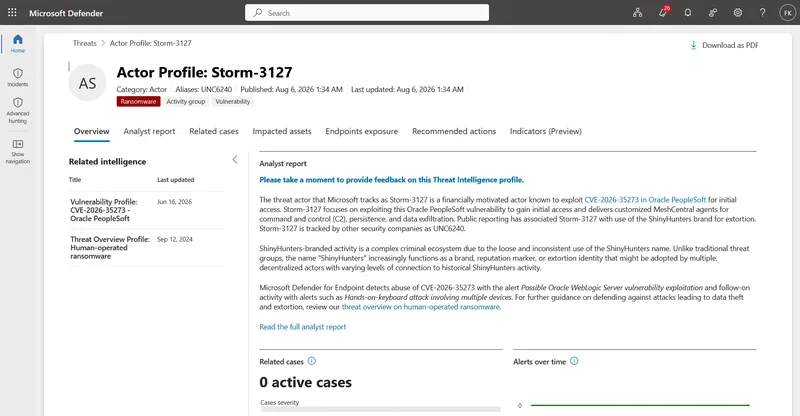
Threat analytics is Microsoft’s in-product threat reporting. Each report has an Overview, an Analyst report, Related incidents, Impacted assets, Endpoints exposure, Recommended actions, and an Indicators tab.
The Overview gives you the threat at a glance: aliases (names used by other vendors), origin, related intelligence, targeted countries and industries, and observed MITRE ATT&CK techniques. It then shows what the threat means for your organization through related incidents, impacted assets, endpoint exposure, and recommended actions.
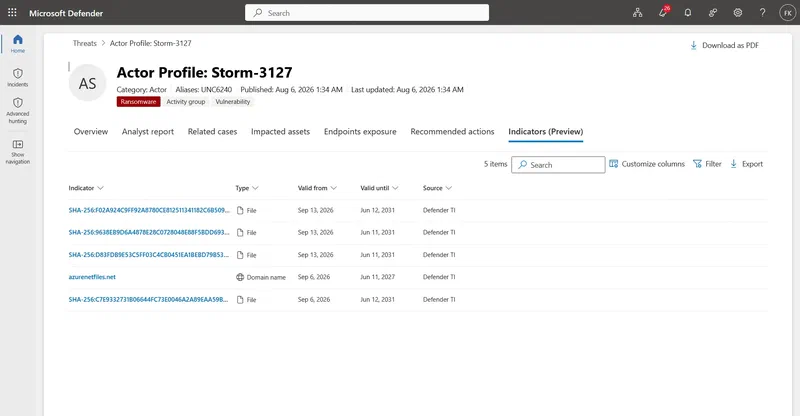
The Indicators tab lists the IoCs tied to the threat. Microsoft researchers update them in real time, and expired IoCs stay in the list so you can investigate past activity. It is marked preview, and only verified customers can access it.
One licensing detail from the documentation: you need a license for at least one Microsoft Defender product to use Threat analytics, and Sentinel SIEM customers only get certain sections or tabs.
Step by step: enabling the connector in Sentinel
Before you start, you need the Microsoft Sentinel Contributor role at the resource group level to install content, and read and write permissions on the Sentinel workspace to configure the connector. Sentinel in the Azure portal is scheduled to move to the Defender portal only after 31 March 2027, so I use the Defender portal paths below.
- Go to Microsoft Sentinel > Content management > Content hub. This is where you install any Sentinel solution, threat intelligence included.
- Find the Threat Intelligence solution and select Install/Update.
- Go to Microsoft Sentinel > Configuration > Data connectors. In my tenant the connector is listed as Threat Intelligence (NEW), next to the older Microsoft Defender Threat Intelligence connector. Microsoft’s documentation does not use that name yet, it still refers to the standard and premium Defender Threat Intelligence data connectors.
- Open the connector page and select Connect. It is not connected by default in a new workspace, so nothing syncs until you do this.
- Wait for the status to change to Connected. Once it does, indicators start flowing into your workspace.
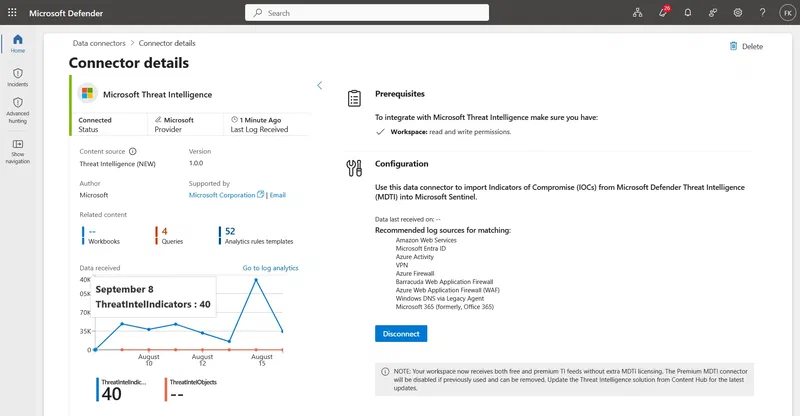
- Confirm it is actually working. Go to Logs and run this:
ThreatIntelIndicators
| where TimeGenerated > ago(1d)
| summarize count() by SourceSystem
Rows within a few minutes means ingestion is working. The ingested intelligence is then available to the TI map... analytics rule templates and to hunting.
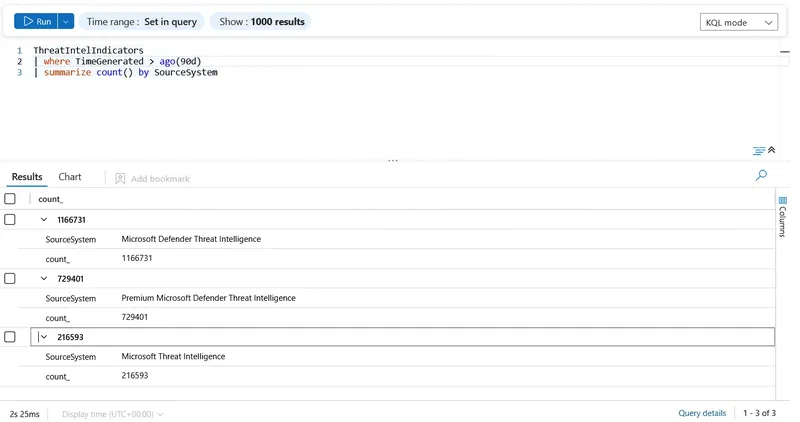
Which table? Sentinel now stores threat intelligence in the ThreatIntelIndicators and ThreatIntelObjects tables. Microsoft stopped ingesting into the legacy ThreatIntelligenceIndicator table in 2025, so queries, rules, and workbooks that still read from it need migrating. Microsoft’s Learn documentation shows how to rewrite those queries for the new schema.
The Graph API side
For enrichment or SOAR automation, the Microsoft Graph Threat Intelligence API is the piece to use. It sits under /security/threatIntelligence and covers hosts, passive DNS, WHOIS, SSL certificates, intelligence profiles, vulnerabilities, and articles. The overview page states that the APIs are available to all customers with a Defender XDR and/or Sentinel license, with no separate license required.
The quickest way to try it is Graph Explorer, Microsoft’s own tool. You sign in with your own account, so there is no app registration, secret, or token to handle. The method reference pages list ThreatIntelligence.Read.All as the least privileged permission, and Graph Explorer uses it as a delegated permission on your signed-in account.
- Open Graph Explorer. Go to
https://developer.microsoft.com/graph/graph-explorer. - Sign in. Select Sign in to Graph Explorer and use an account from your Defender or Sentinel tenant.
- Consent to the permission. Open the Modify permissions tab under the request bar, search for
ThreatIntelligence, and select Consent next toThreatIntelligence.Read.All. If consent is blocked, an admin needs to approve it for the tenant. - Enter the request. Set the method to GET, the version to v1.0, and paste this URL:
https://graph.microsoft.com/v1.0/security/threatIntelligence/hosts/newsplits.com/reputation- Select Run query. The status shows
200 OKand the Response preview tab shows the JSON.
newsplits.com is the domain from the entity page screenshots above. It is only a lookup value in the URL, so don’t browse to it. This is the response I got in Graph Explorer:
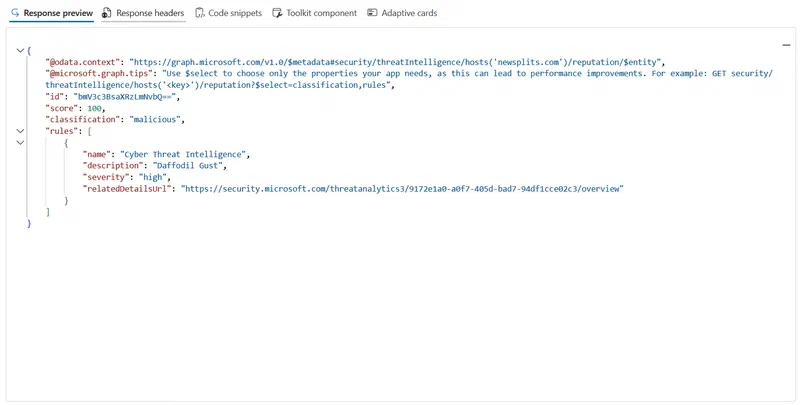
It lines up with the portal view of the same domain: score 100, classification malicious, and one high severity Cyber Threat Intelligence rule with the description “Daffodil Gust”. The id is just the host name, base64 encoded. The relatedDetailsUrl is a link into Threat analytics in the Defender portal, which is how you get from a verdict to the research behind it.
The score and classification pair is what I would use as an automation gate: if classification comes back malicious or suspicious, branch the playbook into containment or further enrichment, otherwise keep it as passive context on the incident.
- Try WHOIS. Change the URL and run it again:
https://graph.microsoft.com/v1.0/security/threatIntelligence/hosts/newsplits.com/whois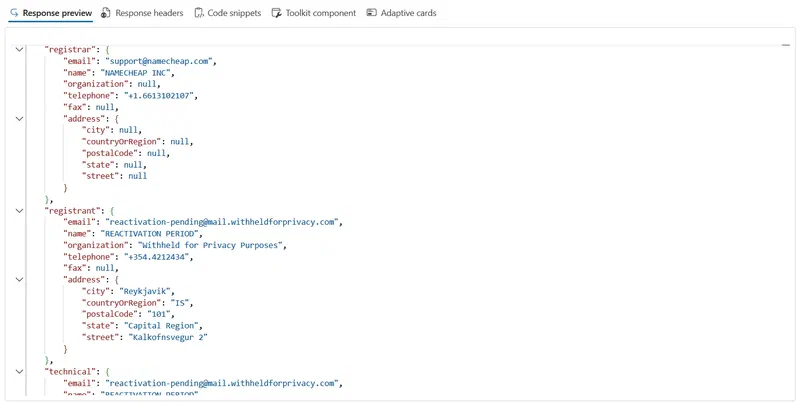
If something fails:
- 403: the permission was not consented, or your account lacks the license or role.
- 401: sign in again.
- A licensing error: see the inconsistency below.
Microsoft’s API overview groups the rest of the surface by use case. These are the ones I would reach for during an investigation:
| Use case | REST resource |
|---|---|
| Read articles about threat intelligence | articles |
| Read intelligence profiles about threat actors and common tools of compromise | intelligenceProfiles |
| Read information about a host, including reputation, cookies, and passive DNS | hosts/{host} |
| Read passive DNS records about a host | hosts/{host}/passiveDns |
| Read WHOIS details for a host | hosts/{host}/whois |
| Read SSL certificate data observed on a host | hosts/{host}/sslCertificates |
| Read details about a vulnerability | vulnerabilities/{vulnerabilityId} |
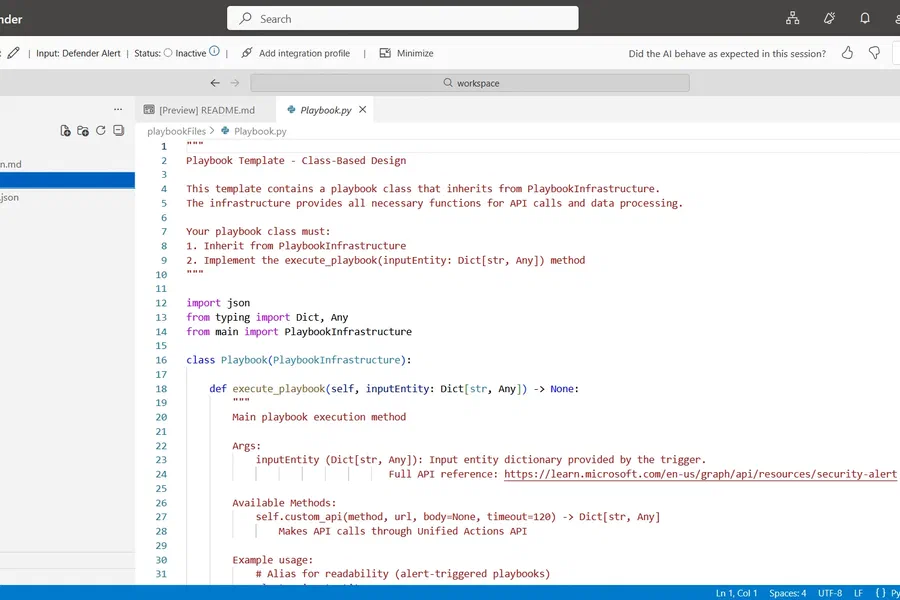
Graph Explorer runs as you, with delegated access. For automation you would register an app and use application permissions with a client secret or certificate, which is a different identity and a different setup.
For a quick phishing check: pull the domain from an incident, call reputation for a fast verdict, and fall back to whois or passiveDns if it is inconclusive.
Doc inconsistency to know about: the hostReputation and host reference pages (and possibly others) still say the API requires an active Defender Threat Intelligence Portal license and API add-on license. That contradicts the API overview and Microsoft’s Message Center notice. If a call fails on licensing, that stale note is likely why.
What I would still check before calling this done
- Preview labels. The entity page Insights tab, the Indicators tab on reports, and the GeoLocation and WhoIs enrichment in Intel explorer are all still marked Preview in Microsoft’s docs. Build accordingly.
- Table migration. Anything still reading
ThreatIntelligenceIndicatoris reading a table that no longer receives new data. - Duplicate connectors. If you run both the older Microsoft Defender Threat Intelligence connector and the newer one, check
SourceSystemonThreatIntelIndicatorsfor duplicates before assuming this was a free upgrade with zero cost impact. - Old rules and old names. Detections scoped to a specific connector or source need a check.
- Licensing wording. Some Learn pages still talk about a separate license, including the Graph reference pages above and the premium prerequisite on the connector page. The Message Center notice says an active Defender or Sentinel license is enough. Confirm in your own tenant.
- Rollout. Do not assume every tenant looks the same. Check the Threat intelligence menu per tenant.
Sources
- Microsoft Tech Community: MDTI convergence in Microsoft Sentinel and Defender XDR is complete
- Microsoft Message Center notice MC1192257: Microsoft Defender Threat Intelligence: Convergence with Microsoft Defender and Microsoft Sentinel (mirror)
- Microsoft Learn: Threat intelligence in Microsoft Defender
- Microsoft Learn: Transition to the new Threat intelligence experience
- Microsoft Learn: Use Intel explorer in Microsoft Defender
- Microsoft Learn: View threat intelligence in entity pages
- Microsoft Learn: Threat analytics in Microsoft Defender
- Microsoft Learn: Enable the Microsoft Defender Threat Intelligence data connector
- Microsoft Learn: Work with STIX objects and indicators in Microsoft Sentinel
- Microsoft Learn: Microsoft Threat Intelligence APIs overview (Microsoft Graph)
- Microsoft Learn: Get hostReputation (Microsoft Graph API reference)
Bottom line
For anyone running Sentinel or Defender XDR, this puts Microsoft threat intelligence inside the tools your analysts already use: entity pages during triage, Intel explorer for pivoting, Threat analytics for reporting, and the Graph API for automation. The catch is not the convergence itself. It is making sure your connectors, tables, analytics rules, and cost baselines do not quietly assume the old setup.


Comments
Comments need JavaScript to load.
Leave a comment
Comments are moderated and appear after approval. Plain text only; links are shown but not clickable.